 blog
blog
7 Best Ways to Qualify Residential Service Leads Without Hiring
Table of Contents
- Why Qualifying Residential Service Leads Without Hiring Staff Works
- 1. Build a Home Service Lead Intake Form That Filters Automatically
- 2. Use Residential Service Call Scripts to Screen Callers Fast
- 3. Ask the Right HVAC Lead Qualification Questions Every Time
- 4. Set Up Automated Lead Qualification for Contractors Using AI
- 5. Score and Prioritize Leads With a Simple Framework
- 6. Speed Up Response Time to Boost Job Conversion
- 7. Track Qualification Metrics to Improve Your Process
- Frequently Asked Questions
Last Updated: October 7, 2026
Why Qualifying Residential Service Leads Without Hiring Staff Works
Most home service businesses don't lose jobs because they lack leads.
This guide from Global Velocity breaks down seven practical ways to qualify residential service leads without hiring staff.
A common mistake is treating every inquiry the same. A caller asking about a small repair and a caller needing a full system replacement get identical treatment. That wastes time you don't have.
The fix is a system. Build it once, and it runs without a front-desk hire.
1. Build a Home Service Lead Intake Form That Filters Automatically
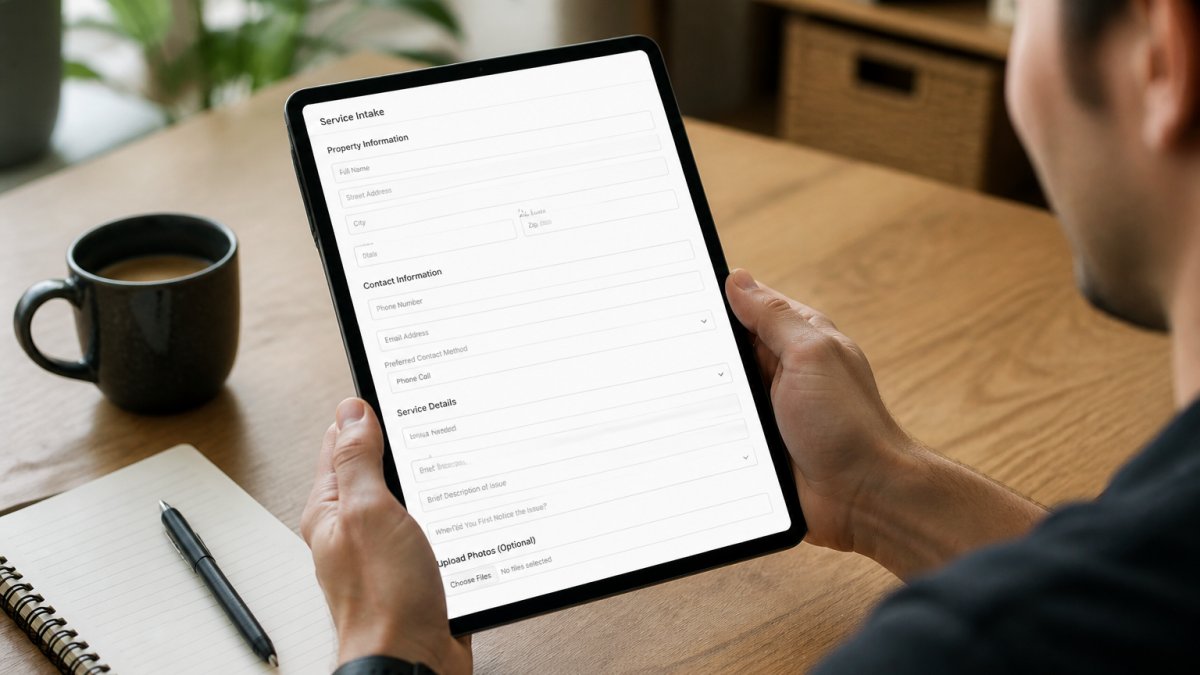
A home service lead intake form is a web form that collects the details you need before a job is booked. It filters out poor-fit inquiries before they reach your phone.
Put the form on your website, your Google Business Profile, and any paid landing pages. Then let it do the first round of screening.
Essential Fields Every Intake Form Needs
- Service type needed
- Property address or postal code
- Whether the property is owned or rented
- Urgency level
- Budget range
- Preferred contact method
- Photos of the problem, if possible
Using Conditional Logic to Screen Leads
Conditional logic shows different questions based on earlier answers. If someone selects "rental property," the form can ask whether the landlord has approved the work.
That single branch saves a phone call. It also flags jobs you may not want to take.
2. Use Residential Service Call Scripts to Screen Callers Fast
Residential service call scripts are short question sets you read on every inbound call. They keep screening consistent when you're busy, and they turn a vague inquiry into a decision: book, follow up, or decline.
The goal isn't to interrogate the caller. It's to learn five things fast: what they need, where they are, how soon, whether they're ready to book, and whether the job fits your trade and service area.
The Five-Question Core Script
"Thanks for calling. To get you the right technician, I have a few quick questions.
- What's the address or postal code where the work is needed?
- Can you describe the problem in a sentence or two?
- Is this urgent, or can it wait a few days?
- Has anyone else looked at or quoted this job?
- If the quote works for you, when could we schedule the visit?"
Five questions. Under a minute. You now know whether to book, follow up, or pass.
Branching Questions by Answer
The core script gets you to a decision point. Branch from there so you don't waste time on poor-fit calls.
- If the address is outside your service area: "We don't cover that area, but I can point you to someone who does." End the call politely and log the lead as out-of-area.
- If the caller is a renter: "Has the property owner approved the work?" If no, ask for the owner's contact and follow up with them directly. Many rental inquiries stall because the tenant can't authorize the spend.
- If the job is outside your trade: "That's not something we handle, but here's who I'd call." Referrals build goodwill and often come back as future work.
- If the caller won't discuss budget or timing: Treat it as a low-priority lead. Book it only if you have open capacity.
- If the caller has already had three quotes: Ask what the other quotes included. You may be able to win on scope or warranty rather than price.
Text and Web-Form Variants
Not every lead arrives by phone. Adapt the same five questions for text and web forms so the screening logic stays consistent.
Text message script:
"Hi [name], thanks for reaching out.
Web form script: Use the same fields as your intake form, but add a required "How soon do you need this done?" dropdown with options like Emergency today, This week, This month, and Just researching.
What to Do With the Answers
Every scripted call should end with one of four outcomes:
- Book now, the caller matches your trade, area, and timeline.
- Follow up, the caller is interested but needs a quote, approval, or time to decide.
- Refer out, the job is outside your trade or area.
- Decline, the caller is a poor fit, a price shopper with no timeline, or a rental without owner approval.
Log the outcome in your CRM or a simple spreadsheet. Over a month, you'll see which outcomes dominate and where your script needs tightening.
3. Ask the Right HVAC Lead Qualification Questions Every Time
HVAC lead qualification questions do more than sort jobs. They tell you what equipment the caller has, how old it is, and whether the fix is a repair or a replacement.
Here's what to ask on every heating or cooling call:
- What type of system do you have?
- How old is the unit?
- Is it heating, cooling, or both that's failing?
- When did you last have it serviced?
- Is the property a home or a rental?
- Has anyone else quoted this job?
Those answers change your pricing, your parts list, and your schedule. Ask them before you dispatch anyone.
The same logic works to qualify residential leads in plumbing, electrical, and construction. Swap the equipment questions, keep the structure.
4. Set Up Automated Lead Qualification for Contractors Using AI
Automated lead qualification for contractors uses software to screen, score, and route inquiries without a person on the line. It answers calls, asks your questions, and books the job.
This is where most small teams hit a wall. You can't answer every call when you're on a roof or under a sink.
Global Velocity solves that with AI employees that answer calls in under two seconds. The system runs your qualification questions in a natural conversational tone trained on your business.
The setup is handled for you, so you don't lose a week configuring software.
5. Score and Prioritize Leads With a Simple Framework
Lead scoring assigns a number to each inquiry so you know who to call first. A simple 1-5 scale beats a complicated system you never use.
Score on four things:
| Factor | Low Score (1) | High Score (5) |
|---|---|---|
| Urgency | Can wait weeks | Emergency today |
| Service match | Outside your trade | Core service |
| Location | Far outside area | Inside service area |
| Budget clarity | Won't discuss | Confirmed range |
Add the four numbers. Anything above 15 gets a callback within the hour. Anything under 8 goes to a follow-up list.
This is the part most guides skip. Priority matters more than volume when you're short on staff.
6. Speed Up Response Time to Boost Job Conversion
Response time is the gap between a lead arriving and your first reply. Shorter gaps win more jobs.
Think about it from the caller's side. They have a burst pipe and they're calling three companies. The first one to answer usually gets the work.
So set a rule: every inbound inquiry gets a reply within five minutes during business hours. After hours, an automated response confirms the booking and sets expectations.
Global Velocity handles this with automated responses and follow-ups. Missed calls get a text back. Quotes, reminders, and review requests go out on their own.
7. Track Qualification Metrics to Improve Your Process
You can't improve what you don't measure. But most small service businesses track too much or too little. Five numbers, reviewed monthly, are enough to see whether your qualification system is working.
The Five Numbers That Matter
**1.
2. Qualified lead rate. Divide qualified leads by total leads. A lead is qualified if it matches your trade, service area, and timeline.
3. Average response time. Measure the gap between a lead arriving and your first reply.
4. Booking rate from qualified leads. Divide booked jobs by qualified leads.
5. Cost per booked job. Add up what you spend on ads, software, and any lead sources, then divide by booked jobs.
How to Track Without Hiring Anyone
You don't need a dedicated analyst. A shared spreadsheet with five columns, date, source, qualified (yes/no), response time, booked (yes/no), takes about two minutes per lead to maintain. Review it at the end of each month.
If you use a CRM, most will calculate these numbers automatically. If you don't, the spreadsheet is enough to spot trends.
What to Do When a Number Moves
- Qualified rate drops: Your intake form or script is letting through poor-fit leads. Add or tighten a screening question.
- Response time climbs: You're too busy to answer quickly. Set up an automated reply that acknowledges the lead and sets a callback window.
- Booking rate falls: Your quotes or follow-up need work. Review your last ten quotes and see where they stalled.
- Cost per booked job rises: A channel is getting more expensive or less effective. Pause it for a month and compare.
A Simple Monthly Scorecard
| Metric | This Month | Last Month | Action If Worse |
|---|---|---|---|
| Lead volume by source | Shift time to best source | ||
| Qualified lead rate | Tighten screening questions | ||
| Average response time | Add automated acknowledgment | ||
| Booking rate from qualified leads | Review quote and follow-up process | ||
| Cost per booked job | Pause or renegotiate channel |
Fill this in on the first of each month. It takes ten minutes and tells you exactly where to focus next.
Frequently Asked Questions
What questions should I ask a home-service lead before booking?
Ask about the service needed, location, urgency, and budget range. For example, 'What type of issue are you experiencing?' and 'When would you like us to come out?' These questions help you qualify residential leads quickly and decide if the job fits your service area and skills. Include them in your intake form or call script to keep the process consistent.
How can a small HVAC company qualify leads without hiring a receptionist?
Use automated lead qualification for contractors. Set up an AI phone system or web form that asks HVAC lead qualification questions, such as system type and urgency. This screens out unqualified leads and books jobs directly into your calendar. Many small businesses use these tools to handle calls 24/7 without adding staff, keeping costs low while capturing every opportunity.
Can AI answer calls and qualify home-service leads?
Yes. AI employees can answer calls in under two seconds, ask your residential service call scripts, and book appointments. They handle common questions, collect intake details, and route urgent calls to you. This means you never miss a lead, even after hours. The AI can also send follow-up texts or emails, keeping your pipeline warm without manual effort.
How quickly should a service business respond to a new lead?
Respond within five minutes. Speed matters: leads contacted within that window are far more likely to convert. Use automated responses to acknowledge inquiries instantly, then follow up with a call or text. If you're on a job, an AI system can handle the initial qualification and schedule a callback, so you don't lose the lead to a competitor.
Qualifying every lead by hand stops working the moment your phone gets busy. Global Velocity gives trades and service businesses an AI employee that answers calls in under two seconds, asks your screening questions in a natural voice, and books jobs around the clock. It also ties your CRM, scheduling, and payments into one system, so nothing falls through the cracks. Book a free demo and see how many more calls turn into booked work.