 listicle
Are Digital Job Site Documentation Tools Worth It in 2026?
Last Updated: October 29, 2026
Quick Summary
Digital job site documentation is worth it when crews use it consistently on site, because it creates a timestamped, searchable record that holds up in disputes, billing, and payroll. The value comes from combining photos, daily reports, and an audit trail with an approval chain. Paper logs are cheap but hard to search and often reach the office days late.
- A timestamped record with an edit history carries more weight than memory in client or warranty disputes.
- Paper logs are hard to search, easy to lose, and usually reach the office days late.
- Test offline capture and sync on a live job before committing to any tool.
- Compare total cost, including per-user fees, minimum seat counts, and add-ons, not just the starting price.
- Choose a daily report that takes minutes to complete, because an incomplete report is worse than a brief complete one.
Table of Contents
- What Digital Job Site Documentation Actually Covers
- Core Benefits for Trades and Service Businesses
- Digital Construction Daily Reports vs. Paper Logs
- Construction Photo Documentation as Evidence
- Choosing Construction Documentation Software
- Job Site Reporting Best Practices
- Getting Your Crew to Document Consistently
- Setting Up Your First Documentation Workflow
- Frequently Asked Questions
What Digital Job Site Documentation Actually Covers
Digital job site documentation is the practice of recording what happens on a job site in a shared, searchable system rather than on paper, in memory or in text messages.
Most trades owners already document jobs in some form. The gap is that the record often lives in a truck, a notebook or a crew lead's phone.
Watch out: a digital system only helps if the crew actually uses it on site.
Core Benefits for Trades and Service Businesses
The benefits of digital job site documentation depend heavily on who is doing the work and who owns the record. A solo contractor, a subcontractor crew, and an employed field team have different approval chains, different data-ownership questions, and different compliance exposure. Treating them the same is where most generic benefit lists fall short.
A single timestamped record that survives disputes
The core benefit is a searchable, time-stamped record tied to the job rather than to a person's phone. When a client disputes a charge or a warranty claim arrives months later, a dated photo, a signed daily report, and an edit history carry more weight than memory. The mechanism that matters is the audit trail: who changed what, when, and whether the crew attested to the entry.
Faster office-side review and billing
Digital records let the office review photos and reports the same day, so problems surface before they become expensive. Billing and client updates go out faster when the underlying details are already captured. For subcontractors, this shortens the gap between completed work and a billable progress claim; for employed crews, it gives payroll a cleaner hours record to approve.
Visibility without being on every site
Owners can see progress across several jobs at once, which matters most for businesses stretched thin.
Contractor type changes the benefit calculation
- Solo contractors benefit most from client-facing evidence: before-and-after photos, signed sign-offs, and a clean record they can attach to an invoice. Data ownership is simple because they own the business and the record.
- Subcontractors benefit from cost-code and job-cost tracking that ties hours and materials to the right project, plus an approval trail the general contractor will accept. The data-ownership question is sharper: who keeps the record if the relationship ends?
- Employed field crews benefit from accurate hours capture, break tracking, and manager approval that feeds payroll. Here the compliance and privacy questions are heaviest, because location tracking and record retention touch labor standards.
The compliance and privacy angle competitors skip
Digital documentation is not automatically compliant just because it is digital. Record retention periods, consent for location tracking, break rules, and jurisdiction-specific labor requirements all apply. GPS monitoring is not universally appropriate; some roles and some jurisdictions require notice or consent, and treating location capture as a default can create more risk than it removes. Before enabling location tracking, confirm what notice your crews receive and how long records are kept.
Accuracy controls that prevent payroll and billing disputes
The benefits only hold if the record is trustworthy. Look for edit histories, employee attestations, manager approvals, and audit trails. These controls let you resolve a missed punch or a conflicting entry without re-arguing the whole day. The unique angle here is dispute resolution: the value of digital documentation is not just that it captures more, but that it can show how a correction was made and who approved it.
Digital Construction Daily Reports vs. Paper Logs
Paper logs are cheap and familiar, but they have real limits.
Digital daily reports fix most of these problems. Entries are typed or selected from lists, attached to the right job, and available immediately.
The trade-off is adoption. Paper requires no training, while digital tools require a short learning curve and reliable phone or tablet access on site.
What a Daily Report Should Capture
A useful daily report answers a few basic questions every day:
- Who was on site and for how many hours
- What work was completed, described in specific terms
- Materials delivered or used, with quantities
Keep the list short. A report that takes twenty minutes to complete will be skipped, and an incomplete record is worse than a brief complete one.
Construction Photo Documentation as Evidence
Photos are often the most valuable part of a job record, because they show conditions that are hard to describe later.
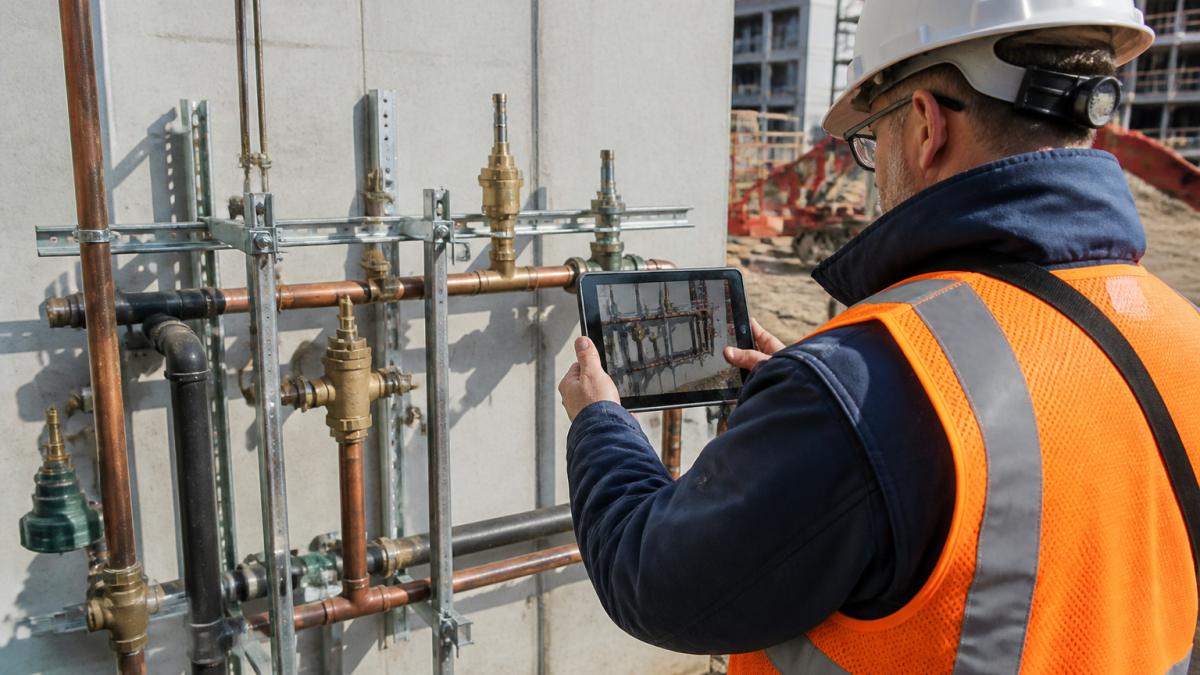
A field technician photographing a completed installation on a tablet, with the job details captured at the same moment, produces the kind of record that holds up well.
Store photos with the job, date and location attached. Photos scattered across personal phones are hard to find and easy to lose, which defeats their purpose.
Choosing Construction Documentation Software
Most comparison tables stop at advertised features. A more useful evaluation separates the constraints that actually decide whether a tool survives on a job site: offline behavior, total cost of ownership, and how the tool handles the messy moments that field crews encounter every week.
Start with offline and weak-signal behavior
Many job sites have poor connectivity, so ask specifically what happens when the signal drops. Does the crew capture entries offline and sync later? What happens if two people edit the same report before syncing? How are missed or conflicting entries resolved? A tool that only works with a live connection will fail exactly when documentation matters most.
Evaluate total cost of ownership, not the starting price
Advertised per-user pricing rarely reflects what a trades business pays. Compare per-user fees, minimum seat counts, hardware needs, implementation and training time, and add-on costs for photo storage, integrations, or e-signature. A lower headline rate with a high minimum seat count can cost more than a higher rate with flexible seats. Build a simple total-cost estimate for your actual crew size and job volume before choosing.
Test with real field scenarios
A credible evaluation uses the situations that break tools in practice: changing job sites mid-day, shared devices between crew members, missed punches, and cost-code changes after work begins. Run a short trial with one crew on one job and score each tool on how it handles those scenarios, not on how polished the demo looks.
Check integrations and data ownership
A tool that duplicates data entry adds work rather than removing it. Our guide on how to sync Google Calendar with your service business CRM shows how a tool can connect to the calendar you already use. Also confirm who owns the data and who can export it, especially for subcontractors whose records may be requested by a general contractor or a client.
A practical comparison framework
| Criteria | Why it matters | What to check |
|---|---|---|
| Offline capture | Sites often lose signal | Offline entry, sync behavior, conflict resolution |
| Photo handling | Photos are core evidence | Date, location, job tags, storage limits |
| Audit trail | Prevents disputes | Edit history, attestations, approvals |
| Integrations | Avoids double entry | Scheduling, invoicing, payroll links |
| Total cost | Budget accuracy | Per-user fees, minimum seats, add-ons |
| Data ownership | Portability and control | Export rights, retention settings |
| Ease of use | Crew adoption | Time to complete a report in the field |
If you are weighing a fuller system, our overview of construction documentation software features can help frame what to compare. The goal is not the longest feature list but the tool that produces a record your crew will actually complete and your office can rely on.
Job Site Reporting Best Practices
Consistency matters more than detail. A daily report completed every day for every job is worth more than a perfect report filed once a week.
Set a fixed time for reports, such as end of day before the crew leaves.
Review reports weekly. Someone in the office should read them, flag open issues and follow up with the crew.
Getting Your Crew to Document Consistently
Adoption is the hardest part. Crews usually resist new tools when they see them as extra paperwork or as a way to monitor them.
Explain the purpose plainly. The goal is to protect the crew when a client questions the work, to avoid repeat trips and to make billing accurate. Let the crew help choose the photo and report format so it fits how they work.
Keep the routine short and tie it to an existing moment, such as the end of the shift. Where a client needs to approve a change or sign off on completed work, a digital signature tool can capture that approval in the same record.
Setting Up Your First Documentation Workflow
Start small. Our guide to centralizing service operations explains how to bring these records into one system as you expand.
Week one, train the crew and run the process on live jobs. Week two, review what was missed and simplify.
If you want a hand setting up the workflow and connecting it to your scheduling and client communication, you can book a free demo to map it out for your business.
Review the workflow every quarter. Documentation that matches how your business runs will keep getting used, and the records it produces will be worth having when you need them.
Frequently Asked Questions
What is digital job site documentation?
Digital job site documentation is the practice of recording work progress, conditions, materials, and issues on a job site using phones, tablets, or web tools instead of paper. Entries are typically timestamped and tied to a specific job, which makes them searchable and shareable with the office and clients. Common records include daily reports, photos, notes, and sign-offs. The main advantage is that a single shared record replaces scattered notebooks, texts, and photos stored on individual devices. Teams can review what happened on a site without needing to reach the person who was there.
What are the benefits of digital job site documentation?
The main benefits are a clearer record of work, faster communication between the field and the office, and less time spent re-entering information. Timestamped photos and notes help when questions come up about scope, progress, or site conditions after the crew has left. Digital records are also easier to organize by job, which supports billing and project reviews. Teams often find that centralized records reduce repeated phone calls asking what happened on a given day. Results depend on how consistently the crew uses the system.
Can digital job site records help prevent disputes?
Digital records can help resolve disagreements because they provide a dated, detailed account of what was done and when. Photos taken at key stages, such as before covering work, show conditions that are otherwise hard to verify later. Daily reports can document delays, weather, or client changes as they occur. However, records only help if they are complete and accurate, so accuracy controls such as required fields and review by a supervisor matter. Consult a legal professional for questions about how records apply to a specific contract or dispute.
How do you get field crews to use digital documentation consistently?
Consistency usually depends on keeping the process short and making the output useful to the crew. Start with a small set of required entries, such as a daily summary and key photos, rather than long forms. Show crews how the records answer their own questions, like finding a previous part number or a site photo. Assign a supervisor to review entries each day and address gaps directly. Revisit the requirements after a few weeks based on what crews actually find useful.